Your European digital identity.On your Android phone.
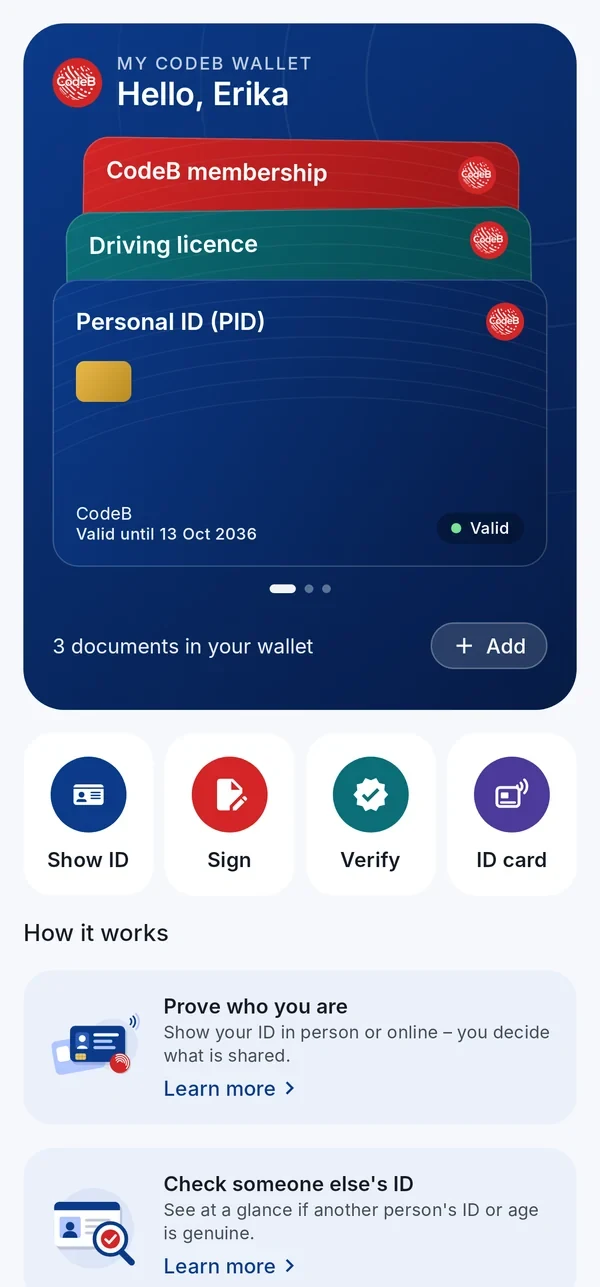
CodeB Wallet is an Android app for the European Digital Identity (EUDI) framework under eIDAS 2.0. Keep your digital ID, mobile driving licence and membership card on your phone, show them in person or online, check other people’s IDs and sign PDFs – and decide for yourself what you share.
Made by Aloaha Limited, Malta – active in PKI, PDF development and digital signatures since 2003 and the maker of the CodeB product family.
Android CodeB Wallet for Android is available on Google Play by invitation – write to info@aloaha.com.
Signature cards · NFC
Sign PDFs with your Maltese eID card – right on your phone
No card reader, no computer, no browser plug-in: hold your signature card to your Android phone and the card signs the PDF. CodeB Wallet itself is not certified.
Maltese eID and residence cards
Your Maltese identity card carries a qualified signature certificate. CodeB Wallet turns your Android phone into the card reader: enter the card access number (CAN), hold the card to the phone, enter your signature PIN – done.
Qualified electronic signature (QES) with the certificate on your Maltese eID card
Also works with Maltese residence cards that carry a signature certificate
The signature key never leaves the card’s chip
Encrypted connection between phone and card (PACE)
PAdES signature with trusted timestamp, checkable in common PDF readers
Professionals and organisations who already use a D-Trust card with NFC sign straight from the phone: the D-Trust Card 5.1 for qualified electronic signatures, the D-Trust Card 5.4 for qualified electronic seals.
D-Trust Card 5.1: qualified electronic signature
D-Trust Card 5.4: qualified electronic seal for organisations
Doctors, pharmacists and other health professionals sign with their health professional card (HBA). Insured persons can sign with their electronic health card (eGK). Both over NFC, without a card reader.
HBA G2.1: qualified electronic signature (QES)
eGK G2.1: advanced electronic signature with the card’s authentication certificate
Card access number (CAN) and PIN – the key never leaves the card
Your free CodeB account – opened with your passport or ID card
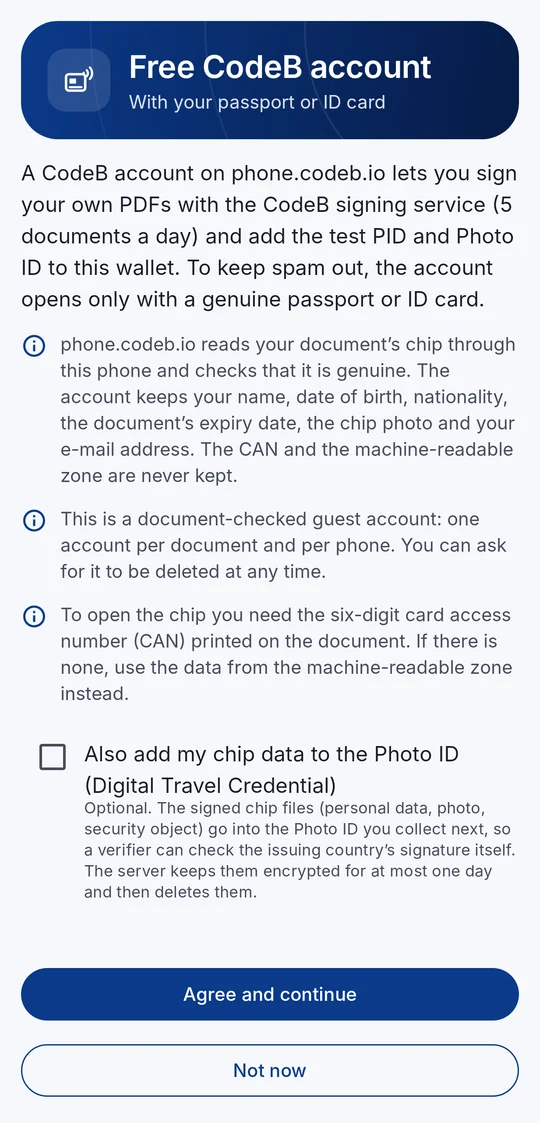
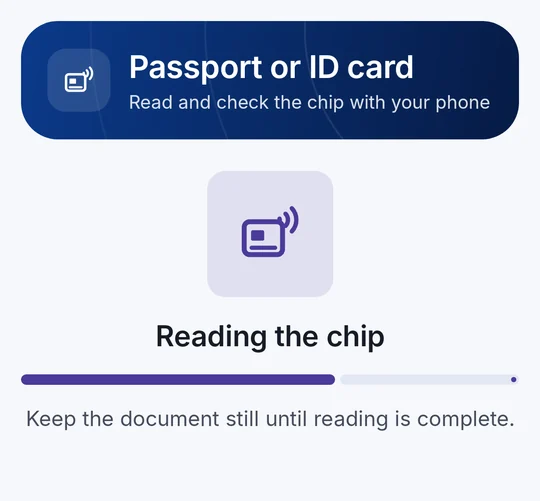
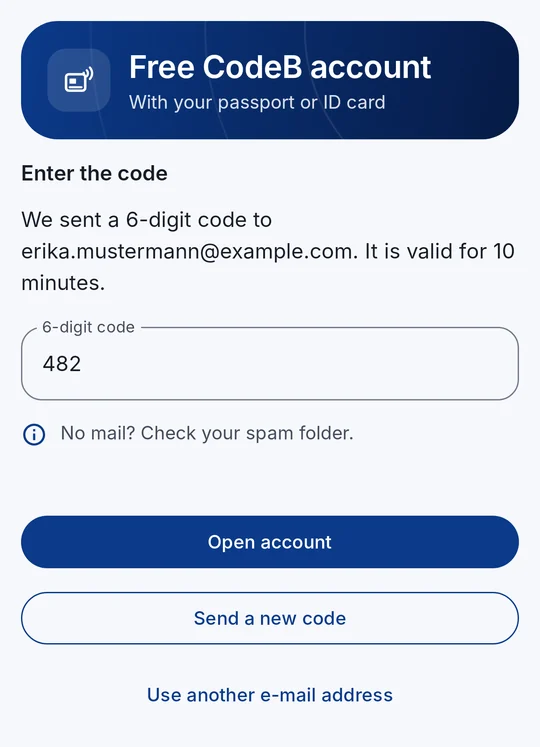
Signing your own PDFs with the CodeB signing service and the test PID and Photo ID need an account on phone.codeb.io. You open it right in the app, in about two minutes: hold your passport or ID card to your phone, confirm your e-mail address – done. No form, no captcha, no waiting for approval.
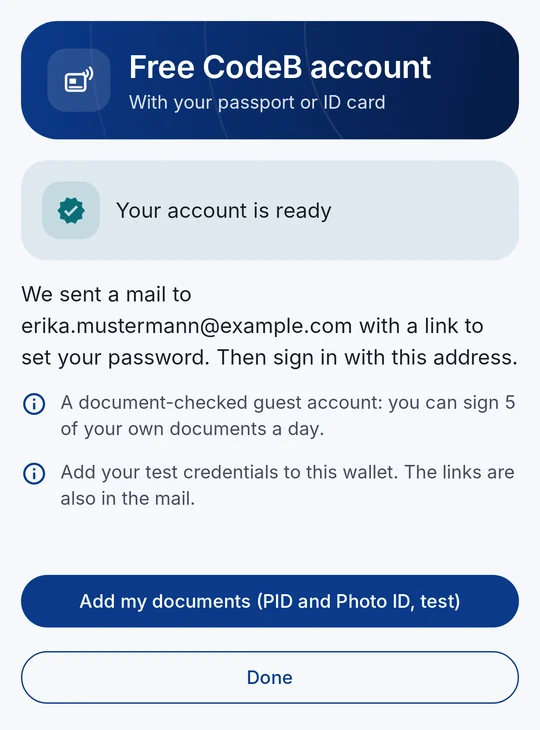
Sign 5 of your own PDFs a day – documents others ask you to sign do not count
Add the test PID and Photo ID straight to your wallet
Works on a freshly installed app – no other card needed
Any passport or ID card with a chip, from any country
On your Android phone, “Open in the app” takes you straight to the account screen – also right after installing.
Why a passport or ID card?
To keep spam and bots out, phone.codeb.io reads the chip of your document through your phone and checks that it is genuine – and that the app is the genuine CodeB Wallet on a genuine phone. One account per document and per phone. The CAN, the machine-readable zone and the raw chip data are never kept.
It is a document-checked guest account – not an official identity and not a qualified signature.
1Read what is checked and kept
2Hold your passport or ID card to the phone
3Type the code from the mail
4Account ready – add the test PID and Photo ID
Pseudonyms · passkeys · available now
Sign in without a password – and without your name
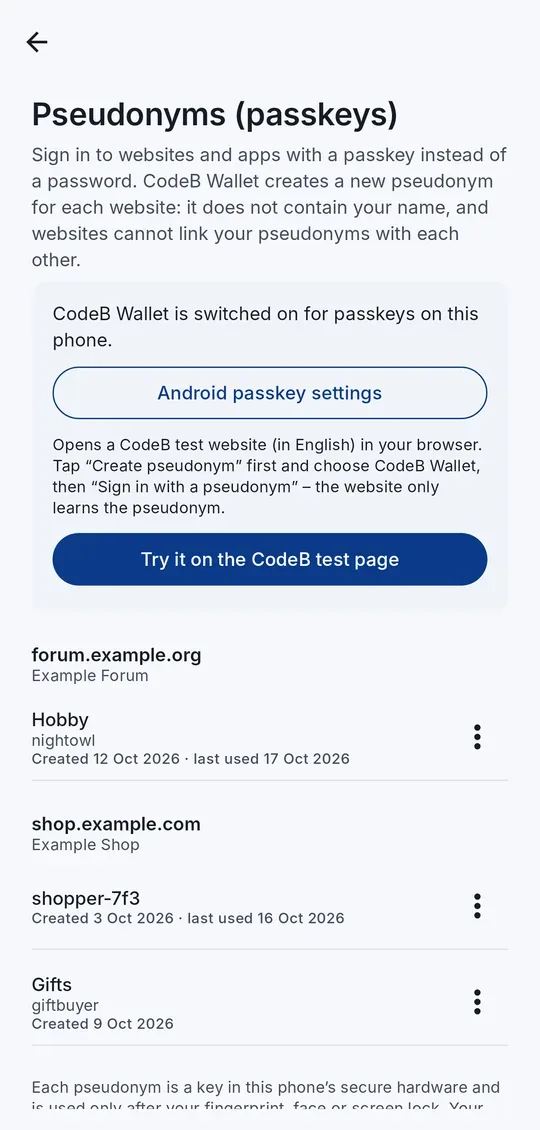
CodeB Wallet already does what the EU Digital Identity Wallet architecture (ARF 3.0, Topic 11) describes for pseudonyms: on any website that offers passkeys, the app creates a new pseudonym just for that website. You confirm with your fingerprint, face or screen lock – no password to remember, nothing to phish, and no name or e-mail address handed over.
A new pseudonym for every website – websites cannot link them with each other
The key stays in your phone’s secure hardware and is used only after you confirm
Built on the passkey standard (W3C WebAuthn) that many websites already support
Rename or delete your pseudonyms in the app – every use is in the History
On an Android 14 phone with CodeB Wallet switched on for passkeys, open our test page in Chrome, tap “Create pseudonym”, choose CodeB Wallet – then “Sign in with a pseudonym”.
Why pseudonyms?
A password can be guessed, leaked or phished, and the same e-mail address lets websites follow you from one to the next. A pseudonym is a key pair made for one website only: the website gets the public key, your phone keeps the private key. It contains nothing about you and works only on the website it was made for.
Needs Android 14 or newer. A pseudonym signs you in – it does not prove who you are; for that, you share your PID.
See it in action
CodeB Wallet in 30 seconds
No mock-ups, no slides: this is the wallet running on a phone today – adding a card, showing an ID, signing a PDF and checking someone else’s ID.
What: CodeB Wallet is an Android wallet app for the European Digital Identity (EUDI) framework – eIDAS 2.0, Regulation (EU) 2024/1183.
Who: developed by Aloaha Limited, Malta – active in PKI, PDF development and digital signatures since 2003, maker of the CodeB product family.
Brand: CodeB is a brand of Aloaha Limited, Malta. CodeB Wallet is developed and provided by Aloaha Limited.
Made in Malta: designed and developed in Malta by Aloaha Limited.
Small download: about 17 MB (the EU reference wallet’s demo APK is 363 MB) (as of 19.10.2026).
Documents: Person Identification Data (PID) including the German PID, mobile driving licence (SD-JWT VC and ISO/IEC 18013-5 mdoc) and the CodeB membership card – issued by the CodeB issuer (phone.codeb.io) via OpenID4VCI. Also: a Photo ID from your passport or ID card, optionally with the Digital Travel Credential (ICAO DTC type 1).
ID cards and passports: reads the chip of electronic passports and ID cards (eMRTD, ICAO Doc 9303) and checks it against the issuing country’s certificates. By our estimate that covers well over a billion documents worldwide: ICAO counts more than one billion ePassports from over 140 issuing states and organisations, and chip ID cards in Europe add, by our estimate, well over 200 million more. The chip can also be used to sign up for your PID at the CodeB PID Provider – right after installing the app. When the CodeB PID Provider reads the chip, the chip and the server set up their own end-to-end encrypted and authenticated channel (PACE, Chip Authentication, Secure Messaging): your phone only forwards messages that nobody in between can read or change unnoticed.
Sharing: online via OpenID4VP; in person via QR code or NFC tap, with the data sent over Bluetooth Low Energy (ISO/IEC 18013-5) – works offline. Selective disclosure, for example only “over 18”.
Wallet and verifier in one: the same app that holds your ID also checks someone else’s ID or age as an ISO/IEC 18013-5 reader, including a revocation check – no separate verifier app needed.
PDF signing: advanced electronic signatures (AdES) in PAdES format with trusted timestamp via the CodeB signing service, using Aloaha’s own PDF signing technology. The document stays on your phone. Signatures from the signing service are not qualified electronic signatures (QES). Also: signing with your own signature card over NFC – the Maltese eID or residence card, D-Trust Card 5, a German health professional card (HBA) or a German electronic health card (eGK). The key stays on the card, and the app shows whether the card’s certificate states a qualified electronic signature. CodeB Wallet itself is not certified.
Privacy: documents and history stay on your phone; keys in secure hardware; no ads, no tracking, no analytics.
Languages: this website and the app are available in English, German and Maltese. The app follows your phone’s language, and you can also choose it under Settings → Language.
Not an official government wallet and not certified – designed to comply with eIDAS 2.0 and the EUDI Wallet Architecture and Reference Framework (ARF).
Features
Everything you need to prove who you are – digitally
CodeB Wallet keeps your documents on your phone, shows them in person or online when you decide, checks other people’s IDs and signs PDF documents.
Personal ID (PID)
Add your Person Identification Data (PID) – including the German PID – from the CodeB issuer (phone.codeb.io). Issuance uses OpenID4VCI; available as SD-JWT VC and ISO mdoc.
Sign in to websites and apps with a passkey from CodeB Wallet: a new pseudonym for every website, kept in your phone’s secure hardware, confirmed with your fingerprint or screen lock. Websites cannot link your pseudonyms.
The app notices when it was changed or is being inspected while it runs, and then refuses to use your keys and documents. Our own code – nothing is sent anywhere.
Runtime self-protection
Mobile driving licence
Keep a mobile driving licence (mDL) on your phone – as SD-JWT VC for online use and as ISO/IEC 18013-5 mdoc for showing it in person.
mDL · ISO/IEC 18013-5
CodeB membership card
Add the CodeB membership card from the CodeB issuer and show it like any other document in your wallet.
Attestation
Add documents your way
Choose the issuer directly in the app, or scan the QR code an issuer gives you – the wallet then starts the issuance for you. Adding a card again replaces the older copy, so your wallet does not fill up with duplicates.
Start with a QR code or an NFC tap; the data then goes phone-to-phone over Bluetooth Low Energy. Both BLE roles are supported for broad reader compatibility, and it works offline.
Show only that you are over 18 – online on websites and apps (OpenID4VP) and in person (ISO/IEC 18013-5). CodeB Wallet can also check someone’s age as a reader, and websites can use the online age check.
CodeB Wallet works as an ISO/IEC 18013-5 reader with a clear verdict – trusted, look closer or do not accept – including a revocation status check. Nothing is stored.
No QR code needed: hold the two phones back to back. The checking phone reads the other phone’s ID over NFC and Bluetooth – handy at a counter or between two CodeB Wallets.
Your organisation can give you an access card in CodeB Wallet. Choose it, tap “Use at reader” and hold your phone to a door or PC reader: the phone answers with the card’s signed data and a fresh signature from a key that never leaves the phone’s secure hardware. Only the card you chose answers, for up to five minutes, and only while your phone is unlocked – it never interferes with your other cards or payment apps. Works offline. Also works with door readers of the open PKOC standard (PSIA): your phone answers with its own public key, which never leaves the phone’s secure hardware.
Your organisation can issue PKI cards to CodeB Wallet, and your phone then acts as a contactless PKI smart card at a Windows PC with an NFC reader. A read/write PKI card is filled by Windows itself with your sign-in certificate; a read-only PKI card carries your organisation’s signing certificate, so programs on the PC can sign with it. Every use needs the card PIN. The read/write card’s key is made in your phone’s secure hardware and never leaves it; for the read-only card, your organisation’s server puts its signing key into your phone’s secure hardware. Only the card you chose answers, and only while your phone is unlocked. Several PKI cards can be held side by side; each shows the name from its certificate. A light on the card screen shows when the phone is connected to the PC’s reader. In the app you can change the card PIN, unblock a read-only card with its PUK, and remove certificates from a read/write card.
An NFC memory card from your organisation turns your phone into a standard NFC tag: a link, a text or a contact card that any phone or NFC reader can read – read-only, or writable so a check-in desk or smart-home reader can store new content on your phone. Works with Home Assistant.
Hold a chip ID card or an ePassport to your phone: CodeB Wallet reads the data on the chip – name, date of birth, nationality, document number, expiry date and the photo – and checks that the issuing country signed it and that the chip is not a copy. You open the chip with the card access number (CAN) or by scanning the machine-readable zone with the camera. Everything happens on your phone. If you save it, it appears as its own card on the home screen, encrypted on your phone. Scanning works for the two long lines of a passport as well as the three lines of an ID card; a switch turns on the camera light in poor light.
Organisations check a person’s passport or ID card remotely: the person holds the document to the phone, and the server reads the chip itself and checks the issuing country’s signature and that the chip is no copy – instead of photos or video calls of the document.
When you add your Personal ID (PID) from the CodeB PID Provider, you can use the chip of your ID card or passport instead of typing your details: the provider’s server reads and checks the chip itself through your phone and fills in your details from it. This works right after installing the app – no other document needed. Your phone shows the server that it runs the genuine CodeB Wallet (Android Key Attestation and Play Integrity).
Create your CodeB account right in the app with your passport or ID card: phone.codeb.io checks that the chip is genuine, you confirm your e-mail address with a code, and you can sign 5 of your own PDFs a day and add the test PID and Photo ID. A document-checked guest account – no spam, no paperwork. The app links this phone’s wallet to your account – if the phone is lost, revoke it on your account page.
A Photo ID (ISO/IEC TS 23220-4, eu.europa.ec.eudi.photoid.1) issued from your checked passport or ID card. If you agree, it also carries the chip data as a Digital Travel Credential (ICAO DTC type 1), so a verifier can check the issuing country’s signature itself.
Manage the list of issuer certificates you trust when verifying. CodeB’s own issuer certificate is built in; you can import further certificates.
Trust list
Sign PDF documents
Sign PDFs with an advanced electronic signature (AdES) – PAdES with trusted timestamp – via the CodeB signing service. You confirm every signature; the PDF stays on your phone.
Hold your signature card to the phone – the Maltese eID or a Maltese residence card, a D-Trust Card 5, a German health professional card (HBA) or a German electronic health card (eGK) – and sign PDFs with the key on the card: no browser, no account. You enter the card access number (CAN) and your signature PIN; the key never leaves the card. The app shows whether the card’s certificate states a qualified electronic signature.
Sign in to phone.codeb.io with the Maltese eID card: scan the QR code on the sign-in page, hold the card to your phone and enter the card’s authentication PIN. The card signs a one-time challenge; your PIN and the card’s key never leave the card, and the sign-in completes in your browser.
Sign in to your CodeB account in the app and send PDFs to other people to sign, one after the other. Follow every answer, save the signed PDF and check any PDF’s signatures – plus two-step sign-in with the app’s own one-time codes and an encrypted backup copy on your account.
A built-in authenticator: scan a website’s QR code and get six-digit sign-in codes (TOTP) on your phone, even offline. Pin, sort into groups such as Work or Family, search, and move all codes to a new phone with a few QR codes.
Each document shows the recent times you shared it – who received it, when, and exactly which details. One tap opens the entry, where you can ask for deletion or report a verifier. Taken from the history on your phone; nothing is sent anywhere.
CodeB Wallet tells you on your phone when a document is about to expire or could not be renewed automatically – one tap opens it to renew. The reminder is created on your phone; nothing is sent anywhere.
Built with the European Accessibility Act in mind: works with the TalkBack screen reader, with very large text and with animations switched off – results, checks and steps are read out clearly, and card colours stay readable.
Accessibility
Guides and changelog
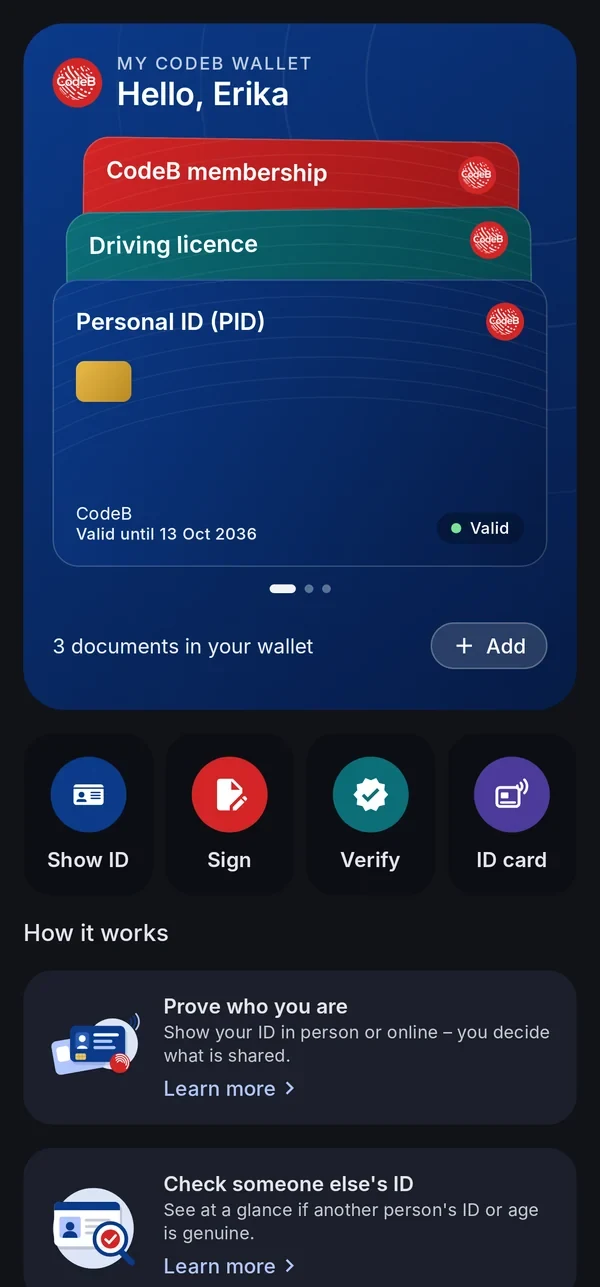
Built-in “Learn more” guides explain every function in plain words, and an in-app changelog shows what is new. Swipe through your cards on the home screen.
The EUDI wallet model separates the issuer of a credential, you as the holder, and the service that checks it.
Get a document
Choose an issuer in the app – such as the CodeB issuer – or scan an issuer’s QR code. Issuance uses the OpenID4VCI protocol.
Keep it on your phone
The document is stored on your device. Its keys are protected by the phone’s secure hardware; the wallet is locked with PIN or biometrics.
Present it
Show it in person via QR code or NFC tap with data over Bluetooth Low Energy (ISO/IEC 18013-5), or online to a website or app via OpenID4VP.
You decide what to share
Before anything leaves your phone, you see who is asking and for what – and you confirm with your PIN or biometrics. Only the attributes you approve are shared.
The complete wallet ecosystem – from one company in Malta, for Malta and the rest of the world
CodeB Wallet is one part. On phone.codeb.io, Aloaha also runs everything around it – wallet provider, issuers, verifier, status lists and signing service – for public bodies, issuers and relying parties to test.
Wallet provider
Checks that the app is the genuine CodeB Wallet on a phone with a locked, verified system – Android Key Attestation against Google’s pinned root and revocation list, with Play Integrity as a second signal – and issues wallet instance and wallet unit attestations. It can revoke a wallet unit; revoked units are published in a status list.
PID provider
Issues the EU Person Identification Data following the EU PID Rulebook, as SD-JWT VC and ISO mdoc, and a German PID. The identity data comes from the chip of your passport or ID card, read end to end by the server (PACE, Chip Authentication, Passive Authentication) – designed to follow ETSI TS 119 461, not certified. Issuer and document-signer certificates come from Aloaha’s own issuing CA.
Attestation issuer
Further credentials from the same issuer: mobile driving licence, Photo ID with Digital Travel Credential, membership cards, access cards and PKI cards for Windows – plus templates for organisations’ own credentials.
Secure issuance
OpenID4VCI with the high-assurance features: pushed authorization requests with PKCE, DPoP-bound tokens, wallet and key attestation checked on every issuance, and encrypted credential responses.
Revocation and status
Every credential carries a status entry: the IETF Token Status List as JWT and, for mdoc, as CWT, plus the W3C Bitstring Status List – optionally with shuffled positions, so observers cannot tell the order of issuance.
Verifier for websites and apps
An online verifier service for relying parties: OpenID4VP with signed requests, X.509 client identification and registration certificates, SD-JWT VC and mdoc, revocation check, EU trusted lists read automatically and OpenID Federation discovery. Tested with the EU reference wallet. Try the verifier test page, the online age check or read the integration guide.
Relying-party register and access certificates
A register of relying parties with the registration details the EU implementing rules list – legal name, identifiers, contact and intended use – with suspension and cancellation, and Aloaha’s own access-certificate CA modelled on ETSI TS 119 411-8, with a published policy and revocation list. Software key, for testing and private use.
Data protection for relying parties
Endpoints where a holder’s data-deletion request and a report to a data protection authority reach the relying party – the counterpart of the app’s data-deletion request.
Signing service
PAdES signatures with a trusted timestamp, signing requests to several people in turn, the Cloud Signature Consortium API v2 for remote signing, and a signature check for any PDF. Signatures from the service are advanced electronic signatures (AdES), not qualified.
Built on open European and international standards
CodeB Wallet follows the EU Architecture and Reference Framework (ARF) and is designed to comply with eIDAS 2.0. It is not certified and it is not an official government wallet.
Standards profile
ARF
Architecture and Reference Framework (ARF)EU framework
eIDAS 2.0 – Regulation (EU) 2024/1183Regulation
OpenID for Verifiable Credential Issuance (OpenID4VCI)Issuance
OpenID for Verifiable Presentations (OpenID4VP)Online
ISO/IEC 18013-5 – QR code, NFC, Bluetooth Low Energy (both roles)In person
Android Key AttestationGenuine app on a verified phone
IETF Token Status List (JWT and CWT), W3C Bitstring Status ListRevocation
ISO/IEC 18013-7 – mdoc online presentationOnline
W3C Digital Credentials API – through Android’s Credential Manager, Android 14+Online
OpenID Federation 1.0Trust discovery
ETSI TS 119 475 – registration certificatesRelying-party registration
ETSI TS 119 411-8 – access certificatesRelying parties
EU PID RulebookPID
Cloud Signature Consortium API v2Remote signing
W3C WebAuthn – passkeys and pseudonymsPseudonyms
Security & privacy
Privacy by design – your data stays with you
Security is Aloaha’s core business: we have worked on PKI, PDF and digital signatures since 2003.
Keys in secure hardware
Cryptographic keys are kept in your phone’s secure hardware.
Protects itself while it runs
CodeB Wallet checks itself every time you open it: if it was changed, or another program is inspecting it (a debugger or a hooking tool), it stops and does not use your keys or documents until that is gone. These checks are our own code, without third-party libraries, and nothing about them is sent anywhere. For the same reason CodeB Wallet does not run on rooted phones, and it needs a phone with the Google Play Store.
Proves it is genuine with your phone’s security chip
When you add a card from the CodeB issuer, CodeB Wallet proves to our own wallet provider that it is the genuine app on a phone with a locked, verified system: the phone’s security chip certifies a fresh key for every request (Android Key Attestation). Google’s Play Integrity check is used as well, but issuing can keep working when Google’s service is unavailable. Only key certificates are sent – never your documents.
PIN and biometrics
The wallet is locked with a PIN and, if you wish, biometrics. Every share and every signature needs your confirmation.
End-to-end protected chip reading
When the PID Provider’s server reads your ID card or passport, the chip and the server set up their own encrypted, authenticated channel (PACE, Chip Authentication, Secure Messaging). Your phone only forwards the messages: neither the phone nor anyone in between can read them or change them unnoticed – at most the reading can be interrupted. The server also checks the issuing country’s signature on the data (Passive Authentication).
Your signature card stays in charge
When you sign with your own card, the key never leaves the card and every signature needs your PIN.
Trusted issuers
Issuer trust is checked against EU trusted lists (ETSI) and your list of trusted issuer certificates.
Status checks
Document status is checked automatically, so revoked documents are recognised. Where the issuer supports it, documents can be renewed automatically before they expire.
On your device
Your documents and your history are stored on your phone, not in a CodeB cloud.
No ads, no tracking
The app shows no advertising and contains no tracking and no analytics.
Our servers protect themselves too
Every server endpoint watches itself while it runs: anomaly detection, rate limits and refusal when in doubt.
No database on the server
All server state lives in encrypted, access-restricted files per customer – a small attack surface, and a full restore from a single backup.
No tracking on our servers either
No third-party analytics and no tracking on the server side.
This website does not track you
No analytics, no cookies, no external requests. Fonts and images are served from this site itself.
Our own PDF technology
PDF signing from a PDF specialist – since 2003
Aloaha has been active in PDF development and digital signatures since 2003. CodeB Wallet uses Aloaha’s own PDF signing technology – the same technology Aloaha uses on its servers.
PDF signing profile
PAdES
Active in PDF development and digital signatures since 2003Heritage
Aloaha’s own PDF signing technologyOwn technology
PAdES baseline B-T: signature with trusted timestampETSI EN 319 142
Advanced electronic signature (AdES) via the CodeB signing serviceAdES
Your own signature card over NFC – the key stays on the cardNFC
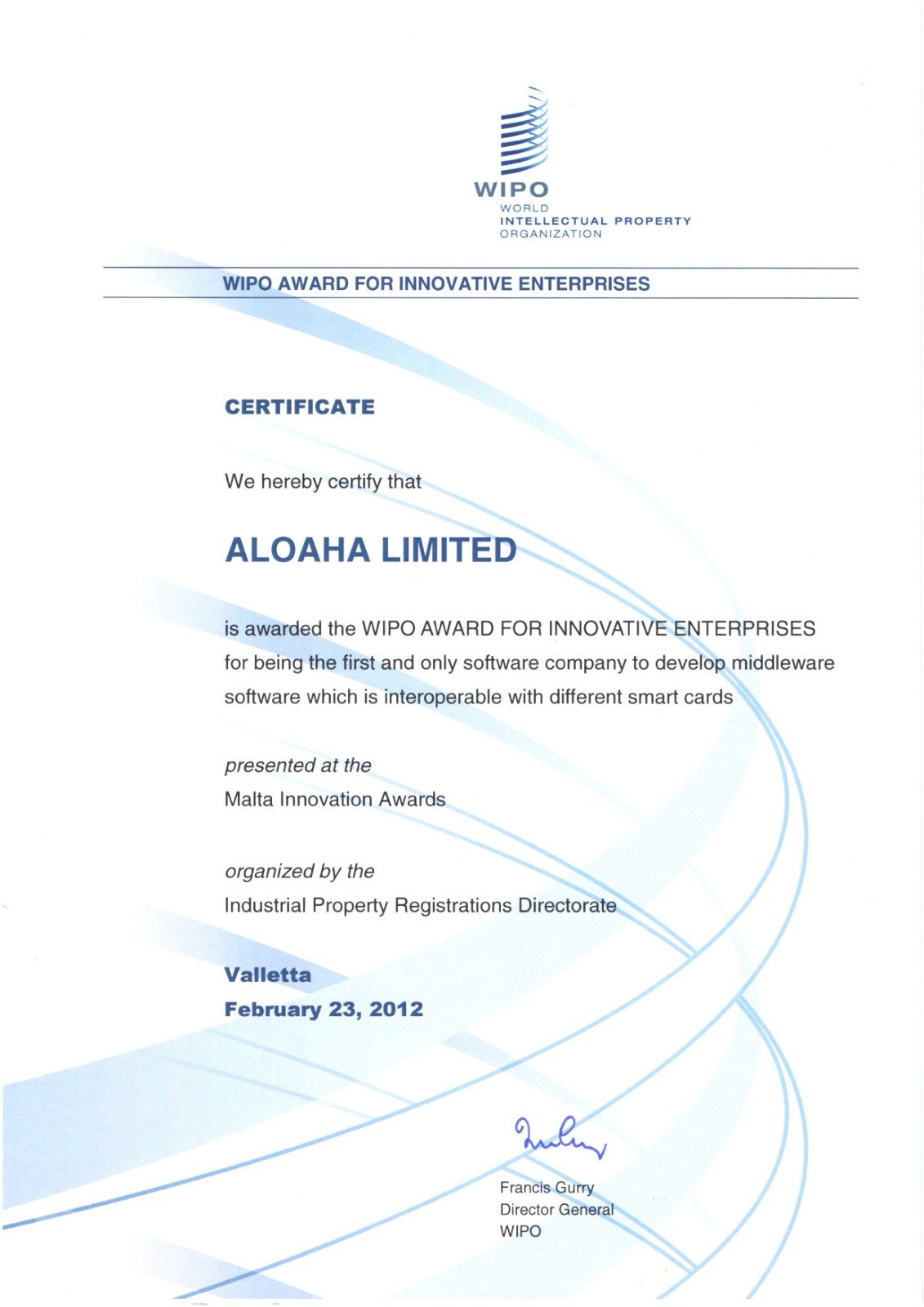
Aloaha Limited, the company behind CodeB Wallet, has built signing, PKI and smart card software since 2003. In 2012 Aloaha received the WIPO Award for Innovative Enterprises at the Malta Innovation Awards in Valletta, for being the first and only software company to develop middleware that works with many different smart cards. The certificate is signed by the Director General of the World Intellectual Property Organization.
The same experience is in CodeB Wallet today: it signs with your signature card over NFC and reads the chip of passports and ID cards.
WIPO Award for Innovative Enterprises, 2012 – Aloaha Limited, the maker of CodeB Wallet. View the certificate
White label
Your own wallet app, built on CodeB Wallet
CodeB Wallet is also available as a white-label solution: your name, your logo and your colours on proven wallet technology – for issuers, banks, public bodies, associations and companies that want to offer their own EU Digital Identity wallet app.
White-label wallet
Available now
Your app name, logo, colours and store listingYour brand
Your issuers, documents and services preconfiguredConfiguration
PDF signing with your signing service or with signature cards over NFCSigning
OpenID4VCI, OpenID4VP, SD-JWT VC and ISO/IEC 18013-5 mdoc, built to conform with ARF 3Standards
Keys in the phone’s secure hardware, PIN protection, no trackingSecurity
Updates and maintenance from Aloaha in MaltaSupport
Optionally with the backend – wallet provider, PID and attestation issuer, verifier, status lists and relying-party register – operated by Aloaha or handed over (file-based, no database)Backend
FAQ
Frequently asked questions
What is CodeB Wallet?
CodeB Wallet is an Android app that stores digital documents – such as your Person Identification Data (PID), mobile driving licence or CodeB membership card – and presents them in person or online. It can also check other people’s IDs and sign PDF documents. It is built for the European Digital Identity (EUDI) framework under eIDAS 2.0, Regulation (EU) 2024/1183, by Aloaha Limited, Malta.
Is CodeB Wallet the German state wallet “d-you”?
No. “d-you” is Germany’s official EUDI wallet, provided by the federal government from early 2027 – according to the federal guidance for municipalities from 2 January 2027 (eudi-wallet.gov.de). CodeB Wallet is a private wallet by Aloaha Limited, Malta, built on the EU wallet rules; it is not a certified EUDI wallet. You can use both on the same phone.
Does CodeB Wallet replace my ID card or passport?
No. Your physical ID card and passport stay valid and you still need them. CodeB Wallet is an additional way to show details from your documents digitally – and only the details you choose.
Who can ask for my data, and how much can they ask for?
Every request names who is asking. CodeB Wallet checks the relying party’s certificate and registration, shows the purpose, and warns you if data is requested that the relying party has not registered. You decide what you share – often a single detail is enough, for example “over 18” without your date of birth.
Can I check someone’s EU wallet credential in person?
Yes. Tap Verify in CodeB Wallet and scan the other person’s QR code: their wallet sends the details phone to phone over Bluetooth, and CodeB Wallet checks the issuer’s signature, that nothing was changed, the validity and the revocation status. Nothing is stored on your phone. In Germany, the federal checking app for in-person checks will not be available when d-you starts.
Can private companies offer EU digital identity wallets?
Yes – EU wallets are certified against EU-wide security and data-protection rules before they are recognised, and according to German federal guidance wallets from private providers can be added from 2028. CodeB Wallet is not certified today, and we do not claim it is.
What are common misunderstandings about EU digital identity wallets?
“The wallet replaces my ID card” – no, physical documents stay valid. “From 2027 everything only works with the wallet” – no, it is introduced step by step, using it is voluntary and the existing ways remain. “Without a smartphone I am excluded” – no, all existing ways stay open. Source: German federal guidance for municipalities, 19 Oct 2026.
What can CodeB Wallet do with a German ID card (Personalausweis)?
With the card access number (CAN) printed on the front, CodeB Wallet reads the travel-document part of the chip – name, date of birth, nationality, document number, expiry date and the photo – and checks that the card is genuine (signature of the issuing state and chip authentication). With it you can also open a free CodeB account and receive a test PID and a Photo ID.
Can CodeB Wallet use the online ID function (eID) of my Personalausweis?
No. The online ID function with your six-digit PIN may only be used by services that hold a state authorisation certificate (Berechtigungszertifikat) and run an eID server; CodeB Wallet reads only the travel-document part with the CAN and never asks for your eID PIN. For the online ID function use the AusweisApp; Germany’s official digital ID in an EU wallet is set up from it in the state wallet d-you. The fingerprints on the chip can only be read by authorities – CodeB Wallet never reads them.
Can I sign PDFs with my Personalausweis?
No. The signature function of the German ID card can only be used with a special state signature-terminal certificate, so CodeB Wallet cannot sign with it. To sign PDFs in CodeB Wallet, use a signature card such as the D-Trust Card 5, the German health professional card (HBA) or the Maltese eID, or the CodeB signing service.
Can I sign in to websites with CodeB Wallet without a password?
Yes – passwordless sign-in with a passkey, on Android 14 or newer: switch CodeB Wallet on as a passkey provider (menu → Pseudonyms → Turn on in Android settings) and choose CodeB Wallet when a website offers a passkey. You get a separate pseudonym for every website – without your name – confirmed with your fingerprint, face or screen lock. In Chrome, set Settings → Autofill services to “Autofill using another service” so that Chrome passes passkeys to CodeB Wallet.
What is the CodeB sign-in card?
A card in CodeB Wallet that lets you sign in to phone.codeb.io without a password. Add it on https://phone.codeb.io/member-card.html (“My wallet credentials”) after signing in; then choose “Sign in with my CodeB sign-in card”. It holds only a random sign-in number for your account – it shows that you hold the card, not who you are. You can revoke it on the same page, for example after losing your phone.
Do I need an account? How do I get one?
Showing and checking IDs works without an account. For the CodeB signing service and the test PID and Photo ID you need a free account on phone.codeb.io, which you create in the app: Settings → Create a free CodeB account. You hold your passport or ID card to the phone, confirm your e-mail address with a code, and the document-checked guest account is ready – with 5 signatures of your own documents a day. Or tap myeuid.app/open/account on your phone – it opens the account screen directly.
Can I ask other people to sign a PDF from the app?
Yes. Sign in to your CodeB account in the app (Settings → CodeB account), open Signing requests and choose your PDFs, the signature level and the people who sign, in order. Each person gets an e-mail and signs with their own EU Wallet or signature card; you follow every step and save the signed PDF in the app.
How can I check whether the signatures of a PDF are valid?
Sign in to your CodeB account in the app (Settings → CodeB account) and tap “Check a signed PDF”. Choose any PDF on your phone: for each signature you see who signed, when, in which format (for example PAdES) and whether the document was changed afterwards. phone.codeb.io checks the PDF and keeps nothing. The certificates are not checked against the EU trusted lists; “qualified” is shown as the certificate states it.
Can I sign a PDF that a website or another person sends me?
Yes. On phone.codeb.io/sign-request someone uploads the PDFs and chooses who signs. You scan the QR code with the QR scanner in CodeB Wallet – or tap “Open in CodeB Wallet” – check who asks and every document, and sign with your signature card or the CodeB signing service. Invited people get an e-mail when it is their turn, and at the end everyone gets a link to the signed PDF. The manual chapter “Sign a document from a website (QR code)” shows every step.
Who develops CodeB Wallet?
CodeB Wallet is developed by Aloaha Limited, a company based in Malta. Aloaha has been active in PKI, PDF development and digital signatures since 2003 and makes the CodeB product family, including CodeB eForms Server and ZUGFeRD Pro.
Which languages does CodeB Wallet support?
CodeB Wallet is available in English, German and Maltese. It uses your phone’s language automatically – English for all other languages – and you can choose a different language under Settings → Language.
What is an EU Digital Identity Wallet?
eIDAS 2.0 (Regulation (EU) 2024/1183) introduces European Digital Identity Wallets: apps in which people can store identity data and other attestations and share them securely with public and private services. The technical rules are described in the EU Architecture and Reference Framework (ARF).
Which documents can I store?
Person Identification Data (PID) including the German PID, a mobile driving licence in SD-JWT VC and ISO/IEC 18013-5 mdoc format, and the CodeB membership card – all from the CodeB issuer (phone.codeb.io). You add them from the issuer list in the app or by scanning an issuer’s QR code. A Photo ID from your passport or ID card – you get it with a free CodeB account.
What is an eMRTD?
eMRTD stands for electronic Machine Readable Travel Document: a passport or ID card with a contactless chip, built to the international standard ICAO Doc 9303. You recognise an ePassport by the chip symbol on its cover. The chip stores the same details as the printed data page – name, date of birth, nationality, document number, expiry date – plus your photo, digitally signed by the issuing country so that any change would be noticed. The chip only opens with a key taken from the document itself – the card access number (CAN) or the machine-readable zone (MRZ), the two or three lines of characters at the bottom of the data page – so it cannot be read without access to the document.
Which ID cards and passports can CodeB Wallet read?
Electronic passports and ID cards that follow ICAO Doc 9303 – in practice most passports issued in recent years and the chip ID cards of the EU and EEA countries. According to ICAO, more than one billion ePassports are in circulation, issued by over 140 states and organisations. 29 EEA countries now issue ID cards with an ICAO-compliant chip; we estimate that well over 200 million of them are in use in Europe. Older cards without a chip cannot be read. CodeB Wallet checks the issuing country’s signature using the country certificates the states publish (CSCA master list). The country certificate list we use (BSI master list, October 2026) covers 115 countries plus the EU and the UN, including all EU member states – see remote ID verification.
My passport’s machine-readable zone is not recognised – what can I do?
Open the photo page flat, hold the phone a little further away so that both lines of letters and numbers fit across the whole frame, and keep it still. In poor light, switch on the camera light on the scan screen. Avoid reflections from the laminate by tilting the passport slightly. If scanning still does not work, you can type the document number, date of birth and expiry date by hand.
Can I use my ID card or passport to get my digital ID?
Yes – at the CodeB PID Provider. When you add your Personal ID (PID), its sign-in page can ask your phone to read your ID card or passport. The provider’s server reads and checks the chip itself over an end-to-end encrypted, authenticated channel; your phone only passes the messages on, cannot read or change them and keeps no copy, and your details are filled in from the chip. It works right after installing the app, without any other document in your wallet.
Can anyone intercept or change my ID card data when the server reads it?
No. When the CodeB PID Provider reads your ID card or passport, the chip and the server build their own end-to-end encrypted and authenticated connection (PACE and Chip Authentication with Secure Messaging, ICAO Doc 9303). Your phone and the internet only carry these protected messages: neither your phone nor a man in the middle can read them or change them without the chip or the server noticing – at most the reading can be interrupted. In addition, the server checks the issuing country’s digital signature over the data (Passive Authentication), so altered data would be rejected.
What is a Photo ID and a Digital Travel Credential (DTC)?
A Photo ID is a standard EU wallet document (ISO/IEC TS 23220-4) with your name, date of birth and photo, issued from a passport or ID card that has been checked. A Digital Travel Credential (ICAO DTC type 1) is a copy of your passport chip’s data that a verifier can check against the issuing country’s signature. CodeB Wallet carries the DTC inside the Photo ID – only if you agree – and not as a separate document.
Can I sign PDF documents with CodeB Wallet?
Yes. CodeB Wallet signs PDFs with an advanced electronic signature (AdES) in PAdES format, with a trusted timestamp, via the CodeB signing service. You confirm every signature, and the PDF stays on your phone. CodeB Wallet uses Aloaha’s own PDF signing technology; Aloaha has been active in PDF development and digital signatures since 2003. Signatures from the signing service are not qualified electronic signatures (QES). You can also sign with your own signature card, such as the Maltese eID.
Can I sign with my Maltese eID or another signature card?
CodeB Wallet signs PDFs over NFC with the Maltese eID and Maltese residence cards, the D-Trust Card 5, the German health professional card (HBA) and the German electronic health card (eGK). Newly added – feedback welcome: the ID cards of Finland, Portugal (Cartão de Cidadão issued from June 2024) and Spain (DNIe 3.0 and 4.0). Enter the 6-digit card access number (CAN) printed on the card, hold the card to your phone and enter your signature PIN. The card itself makes the signature – the key never leaves the card – and CodeB Wallet adds it to the PDF as a PAdES signature with trusted timestamp. The app shows whether the card’s certificate states a qualified electronic signature; CodeB Wallet itself is not certified.
Can CodeB Wallet check someone else’s ID?
Yes. CodeB Wallet works as an ISO/IEC 18013-5 reader. With “Verify” you choose what you need – for example only “over 18” – and scan the QR code shown in the other person’s wallet. After they agree, the data arrives over Bluetooth. CodeB Wallet checks the issuer’s signature against your list of trusted issuer certificates (CodeB’s own certificate is built in, and you can import more), that the data is unchanged and belongs to the presenting phone, the validity period and the revocation status. You get a clear verdict – trusted, look closer or do not accept – and the data is deleted as soon as you close the result. Wallet and verifier come in one app – many wallet solutions need a separate app for checking IDs.
Can I use it in person and online?
Yes. In person, you start with a QR code or an NFC tap and the data is sent over Bluetooth Low Energy according to ISO/IEC 18013-5 – no internet connection needed. Both Bluetooth roles are supported for broad reader compatibility. Online, websites and apps request data via OpenID4VP, and you confirm every request with your PIN or biometrics.
What does selective disclosure mean?
Selective disclosure lets you share only the information a service needs. For example, you can confirm that you are over 18 without revealing your date of birth. The SD-JWT VC and ISO mdoc formats support this.
Is my data safe?
Your documents and your history are stored only on your phone. Cryptographic keys are kept in the phone’s secure hardware, the wallet is protected by PIN and optionally biometrics, and nothing is shared without your confirmation. The app has no ads, no tracking and no analytics.
In which countries can I use CodeB Wallet?
CodeB Wallet is built for the EU Digital Identity framework, which applies in all EU member states. Our first focus is Malta, Germany and Austria. Which documents you can use depends on the issuers available to you.
Is CodeB Wallet an official or certified wallet?
No. CodeB Wallet is not an official government wallet and it has not been certified. It is developed by Aloaha Limited and designed to comply with eIDAS 2.0 and the EU Architecture and Reference Framework (ARF). We will only call it certified once a certification has actually been completed.
Which issuers can I use?
In Settings you choose which issuers the wallet uses – currently the EU reference issuers and the CodeB issuer. Issuers are checked against EU trusted lists (ETSI).
How do I move CodeB Wallet to a new phone?
On the old phone go to Settings → Back up to a file and choose a password. On the new phone install CodeB Wallet, set your PIN and tap “New phone? Restore from a backup”. The history comes back and each issuer issues your documents again – the file never contains the data inside your documents or their keys. One-time code accounts come along too. Signed in to your CodeB account, you can also keep an encrypted copy of the backup on your account (Settings → CodeB account → Save a copy now) – only your backup password opens it.
Can CodeB Wallet create sign-in codes for two-step sign-in (2FA)?
Yes – CodeB Wallet has a built-in authenticator app for two-factor authentication (2FA). Open the menu → One-time codes and scan the QR code the website shows when you turn on two-step sign-in. CodeB Wallet creates the six-digit codes (TOTP, RFC 6238) on your phone, also offline. The keys stay on your phone, apart from your documents, and are never shared with a website or verifier.
Can I sort my one-time codes into groups?
Yes. In One-time codes, tap the three dots next to an account → “Move to a group”, or choose a group when you enter a key. Groups such as Work or Family appear A–Z below your pinned accounts and open or close with a tap; the pencil next to a group renames or removes it, and the search looks through all groups. Groups come along when you move your codes to a new phone.
How do I move my one-time codes to a new phone?
Either include them in “Back up to a file” and restore that file on the new phone, or open One-time codes → Transfer all accounts and scan the QR codes with the new phone – in CodeB Wallet or another authenticator app. Codes from another authenticator app come in the same way: scan its transfer QR codes in CodeB Wallet.
The app said “Update ready”, but “Restart” did nothing – what now?
Since version 2026.10.32 the button opens CodeB Wallet’s page in the Play Store when Google Play cannot finish the update itself (for example right after a phone update). With older versions: open the Play Store, search for CodeB Wallet and tap Update.
How do I delete everything from CodeB Wallet?
Open Settings → Delete wallet and confirm with your wallet PIN. All documents, the history, your settings and the keys are removed from your phone. Accounts with issuers or signing services are separate – for services of Aloaha Limited write to info@aloaha.com.
When can I download CodeB Wallet?
CodeB Wallet for Android is available on Google Play by invitation – write to info@aloaha.com.
Can I open doors with CodeB Wallet?
Yes, with a CodeB Access card from your organisation. Open the card, tap “Use at reader” and hold your phone to the reader. The reader checks the card offline: the issuer’s signature, the validity, your sites and groups, and a fresh signature from a key that stays in your phone’s secure hardware.
Does an access card in CodeB Wallet interfere with payments or other NFC apps?
No. CodeB Wallet answers access readers only for the card you chose, for at most five minutes and only while your phone is unlocked. At all other times its access function is switched off, so payment apps, other wallets and your other cards work exactly as before.
Which door readers work with CodeB Wallet?
Readers set up for CodeB Access (ISO/IEC 18013-5 data, checked offline) and readers of the open, royalty-free PKOC standard (Public Key Open Credential, PSIA). For PKOC your organisation enrols the card ID shown on your access card.
Can I use my phone as a smart card to sign in to Windows?
Yes, with a read/write PKI card in CodeB Wallet and a PC with a contactless (NFC) reader: Windows puts your sign-in certificate on the card itself, and you sign in with the card PIN. A read-only PKI card carries your organisation’s signing certificate for signing on the PC. Every use needs the card PIN, and the read/write card’s key never leaves your phone’s secure hardware.
Can I change the PIN of my phone’s PKI card?
Yes. Open the PKI card in CodeB Wallet and tap Change card PIN: enter the current PIN and the new one twice, then confirm with your fingerprint, face or screen lock. A wrong current PIN counts as a wrong try, exactly as at the PC. If a read-only card’s PIN is blocked, tap Unblock with PUK. You can also change the PIN from Windows as with any smart card. The PIN never leaves your phone.
How do I know my phone is connected to the PC’s card reader?
After Use at PC, a light on the card screen shows the connection: grey and pulsing while the phone waits, green while it is connected to the reader (it flickers when data goes through), red if the connection drops – then hold the phone to the reader again.
Can I remove a certificate from my phone’s PKI card?
Yes, on a read/write PKI card: open the card, tap Remove next to the certificate and enter the card PIN. The certificate and its key are deleted from the card for good.
My Xiaomi phone does not answer at the PC’s reader as a PKI card – what can I do?
On Xiaomi phones (MIUI) open Settings → Connection & sharing → NFC and set Secure element position to HCE Wallet. With “SIM wallet” or “eSE wallet” the phone passes the reader’s commands to the SIM or its secure chip instead of to CodeB Wallet, and Windows reports a card that needs a driver. Then open the card in CodeB Wallet, tap Use at PC and hold the back of the phone (near the camera) on the reader.
Is CodeB Wallet available as a white-label solution?
Yes. Organisations can offer CodeB Wallet as their own wallet app – with their own name, logo, colours and store listing, and with their issuers, documents and services preconfigured. The technology, updates and maintenance come from Aloaha Limited in Malta. Write to info@aloaha.com with the subject “CodeB Wallet white label”.
Can I sign in to websites with my Maltese eID card and my phone?
Yes, at phone.codeb.io: choose Sign in with eID card, scan the QR code with your phone, enter the card access number (CAN), hold the card to the phone and enter the card’s authentication PIN. CodeB Wallet lets the card sign a one-time challenge; the PIN and the card’s key never leave the card, and your browser is signed in. Only the Maltese eID card is supported for now.
What happens if I lose my phone with CodeB Wallet?
Your documents are protected by your phone’s screen lock and the app’s own PIN. If you were signed in to your CodeB account in the app, this phone’s wallet is linked to your account: open your account page on phone.codeb.io and revoke it. phone.codeb.io then no longer trusts that wallet and withdraws the documents it issued to it.
Can a reader write to an NFC memory card in CodeB Wallet?
Only if the issuer allows it for that card. Then a reader can write to the card while you hold the phone to it with the card open. What a reader writes stays on your phone only; the card shows when it was written, the last writes, and Restore issued content. Content written by a reader is not confirmed by the issuer.
Can my phone act as an NFC tag?
Yes. With an NFC memory card from your organisation, CodeB Wallet makes your Android phone answer as a standard NFC tag (NFC Forum Type 4, NDEF) – read-only, or writable so a reader can store new content on your phone. Details: read-only NFC tag and writable NFC tag.
Can organisations verify ID documents remotely with CodeB Wallet?
Yes. The person holds their passport or ID card to the phone; phone.codeb.io reads the chip itself through an end-to-end encrypted channel and checks the issuing country’s signature and that the chip is no copy. It proves a genuine document was present – face matching is planned. See remote ID verification.
Would you like to test CodeB Wallet?
CodeB Wallet for Android is available on Google Play by invitation – write to info@aloaha.com. Issuers and services that want to accept EUDI credentials are welcome to get in touch too.