
eANV and qualified electronic signatures: your D-Trust card, your phone as the card reader
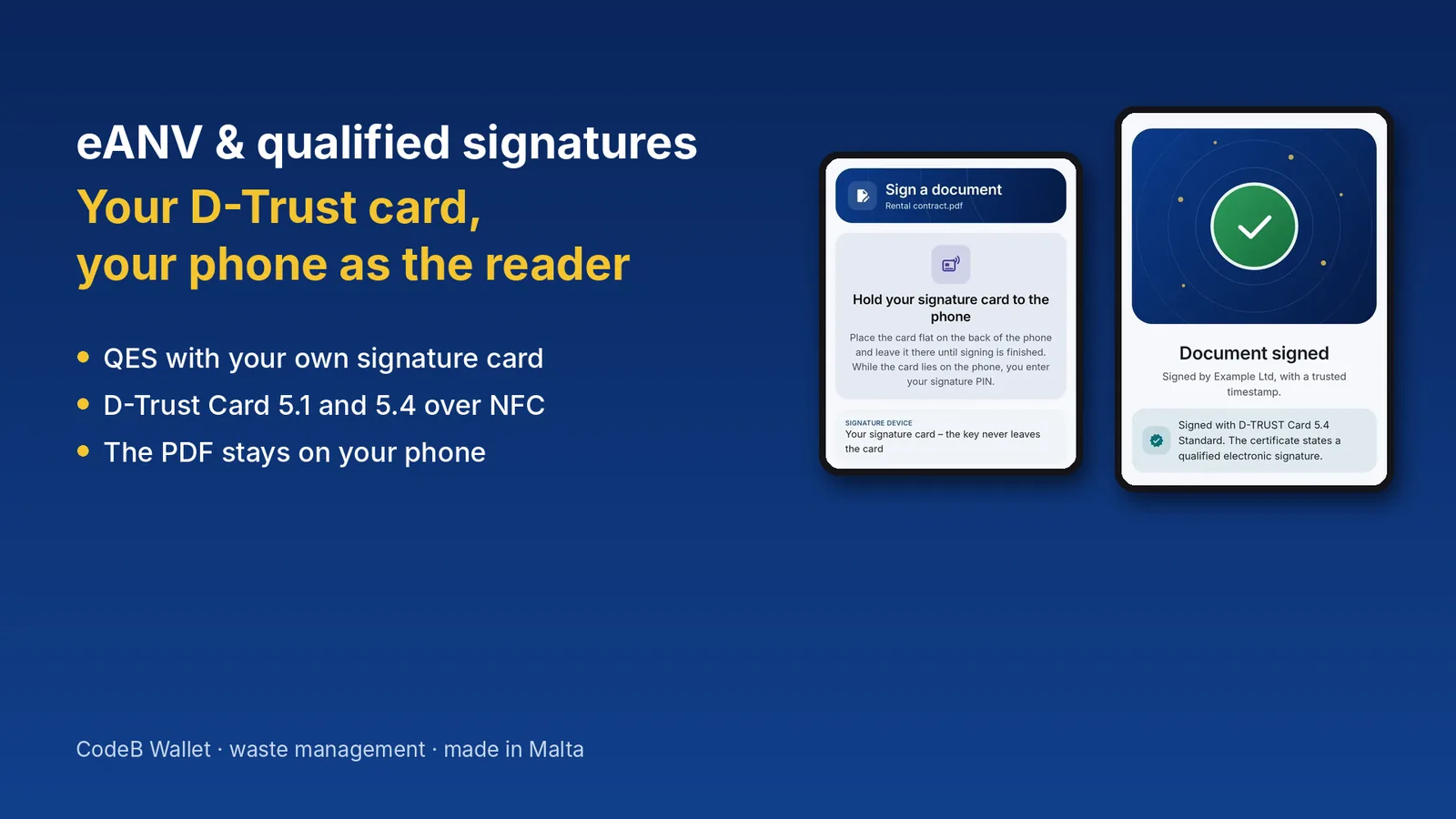
In Germany, anyone who produces, transports or disposes of hazardous waste signs disposal certificates, consignment notes and acceptance slips electronically – in the electronic waste tracking procedure (eANV, elektronisches Abfallnachweisverfahren), with a qualified electronic signature (QES). This use case shows what the eANV requires and how companies use their existing D-Trust signature card with CodeB Wallet right on an Android phone.
What is the eANV?
The electronic waste tracking procedure is set out in Germany's Waste Record Ordinance (Nachweisverordnung, NachwV). Since 2010 (disposers) and 2011 (producers and carriers), the records for the disposal of hazardous waste are kept electronically: the disposal certificate (Entsorgungsnachweis) before disposal, the consignment note (Begleitschein) for every transport and the acceptance slip (Übernahmeschein) for collective disposal – plus the electronic register.
The documents are exchanged through the federal states' central coordination office ZKS-Abfall – with own software or in the free Länder-eANV portal. About 30,000 companies take part in the eANV every year.
Producers with no more than two tonnes of hazardous waste a year are exempt (small quantities, § 2(2) NachwV) – but they still have to keep the acceptance slips.
Why the qualified electronic signature is mandatory
§ 19 NachwV requires a qualified electronic signature stating the signer's name in plain text for the electronic records. It replaces the handwritten signature on the former paper form.
A consignment note is signed in turn: first by the producer, then by one or more carriers, finally by the disposer. Each party signs its own part; the signing times are recorded to the second. The obliged parties must sign themselves – a service provider may prepare forms but cannot sign for you.
The QES is personal: it is created with a qualified certificate on a signature card or at a qualified trust service provider. Many waste-management companies use D-Trust signature cards, which can be applied for through the German chambers of commerce (IHK), among others.
Everyday reality: card, card reader, workstation
In the classic setup the signature card sits in a card reader at one particular PC. That works – as long as the person authorised to sign is at that desk. On the road, at home, on site or when standing in for someone, one thing is often missing: the card reader with the right software.
Then there is the paperwork around the records: disposal contracts, offers, acceptance declarations, weighing slips and delivery notes as PDF, certificates, letters to authorities and e-invoices. Here, too, a qualified signature is often required – or at least the safe choice.
Use case: a waste disposal company signs on the go
Example scenario. The operations manager of a mid-sized waste disposal company holds a D-Trust Card 5.1 with a qualified certificate – the same card the company uses to sign its eANV documents. A customer e-mails a disposal contract as a PDF that must come back with a qualified signature today. She is not in the office.
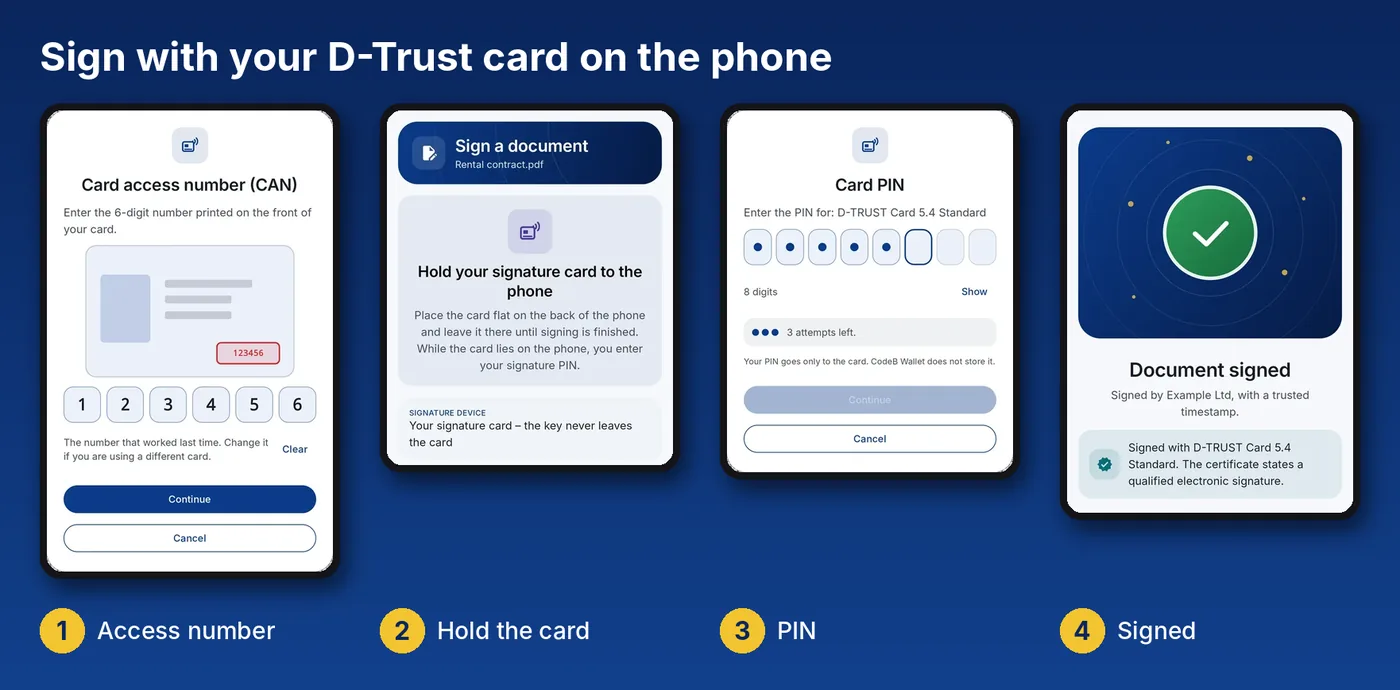
She shares the PDF from the e-mail to CodeB Wallet, taps Sign it myself, places her visible signature where it belongs, holds the D-Trust card to the back of her Android phone and enters her signature PIN. A few seconds later the contract carries a qualified electronic signature with a trusted timestamp and goes back to the customer. No card reader, no particular PC.
If the customer has to sign as well, she sends the contract on as a signing request with Ask others to sign: with a signature box for each person, in the right order.
What CodeB Wallet does for waste management today
Your existing signature card: D-Trust Card 5.1 (qualified signature) and D-Trust Card 5.4 (qualified seal for organisations), Standard and Multi, over NFC on an Android phone. The card creates the signature; the key never leaves the chip.
A qualified signature on any PDF: PAdES signature with a trusted timestamp. After signing, the app shows whether the certificate states a qualified electronic signature. PDF/A documents such as ZUGFeRD and Factur-X e-invoices stay conformant.
Confidential: when you sign on the phone with your own card, the document never leaves the phone. Only a fingerprint (hash) is sent for the timestamp.
No account: signing with your own signature card needs neither an account nor a browser.
Important: the eANV documents themselves – disposal certificate, consignment note, acceptance slip – are XML messages following the BMU data interface. Today you keep signing these in your eANV software or in the Länder-eANV. CodeB Wallet adds the qualified signature for every PDF document around waste disposal.
How to start
- Request access: send us the e-mail address of the Google account you use in the Play Store on your Android phone – via Join. We unlock the address.
- Install CodeB Wallet from Google Play – like any other app.
- Share a PDF to CodeB Wallet, choose Sign it myself, enter your D-Trust card's access number (CAN), hold the card to the phone and enter your signature PIN.
Outlook: signing eANV documents directly in the app
We are working on letting CodeB Wallet sign the eANV documents themselves – in the XML format of the BMU data interface with its signature layers – with your signature card. A carrier's driver could then, for example, sign the consignment note at pick-up directly with his card on the phone. As soon as it is available, you will find it in the changelog.
Want an early look? You use the eANV and would like to try eANV signing in CodeB Wallet before release? Write to us at info@aloaha.com – we will get back to you about a preview.
Sources
§ 2 NachwV · § 19 NachwV · ZKS-Abfall · BMUV, FKZ UM 19330020 (2023)
Questions about the eANV and qualified signatures
Is a qualified electronic signature mandatory for the eANV?
Yes. § 19 NachwV requires a qualified electronic signature stating the signer's name in plain text for the electronic records and consignment notes. It replaces the handwritten signature.
Who has to take part in the eANV?
Producers, carriers and disposers of hazardous waste in Germany. Producers with no more than two tonnes of hazardous waste a year are exempt from the record duty (small quantities, § 2(2) NachwV); acceptance slips are still required.
Can CodeB Wallet sign eANV consignment notes?
Not today: eANV documents are XML messages following the BMU data interface and are signed in your eANV software or the Länder-eANV. CodeB Wallet signs PDF documents with a qualified signature using the same D-Trust card – for example disposal contracts, acceptance declarations or certificates.
Does my D-Trust signature card work with the phone?
Yes, if it has an NFC interface: the D-Trust Card 5.1 and 5.4 (Standard and Multi). Generation 4 cards have no contactless interface and still need a card reader at a computer.
Do I need a card reader?
No. The Android phone with NFC reads the card. You enter the access number (CAN) printed on the card and your signature PIN.
Does the document leave the phone when I sign?
No. When you sign with your card on the phone, the PDF stays on the phone. Only a hash is sent for the timestamp.
May a service provider sign in the eANV for me?
No. Service providers may prepare and send forms, but the obliged parties must sign themselves – with their own qualified signature.