
Strong customer authentication · TS12 · Payments
Payment confirmation – see what you pay, confirm with your fingerprint
Your bank or payment service can add a payment card to CodeB Wallet. When you then pay, log in or allow access to your account, it asks your wallet to confirm: CodeB Wallet shows who gets the money, the amount and every other detail in your language, and you confirm with your fingerprint, face or screen lock. Your confirmation is bound to exactly these details – change one cent and it is no longer valid.
- Payee and amount always shown
- Fingerprint, face or screen lock
- Bound to exactly what you saw
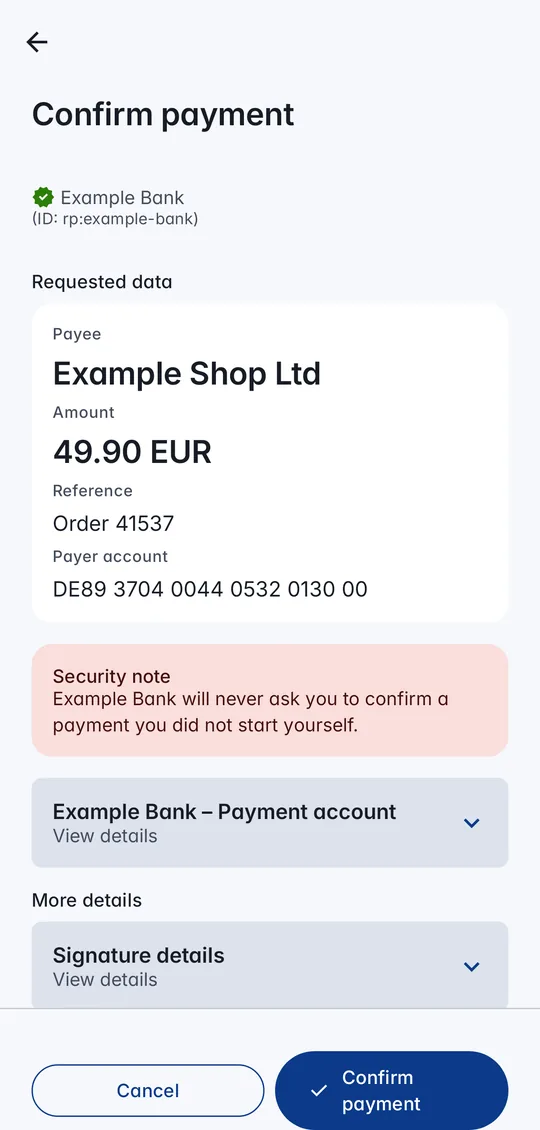
How a payment confirmation works
- 1Your bank asksWhen you pay, your bank or payment service asks CodeB Wallet to confirm – with a QR code or a link on the same phone.
- 2You see the detailsPayee, amount and currency first, then everything else – with the bank’s own labels in your language.
- 3You confirmWith your fingerprint, face or screen lock. The key of your payment card works only right after you unlock.
- 4The bank checksThe confirmation is signed for exactly these details; the bank checks it and carries out the payment.
What you can confirm
Payments – one-off and recurring, with payee, amount, currency and how often.
Logins and risk checks – confirm that it really is you signing in to your bank or approving an action.
Access to your account information – allow a service to read your payment account and see who gets access.
E-mandates – allow a direct debit or recurring payments, with the text of the mandate.
Built to be safe
Never sign what you did not see: payee, amount and the other key details are always on the first screen, whatever the request says. Every other detail is listed below them.
Refused instead of guessed: if the bank’s label for a detail is missing, CodeB Wallet does not show the request at all rather than show it incompletely.
Checked bank texts: the labels come from the description of your payment card, which the wallet loads from the bank and checks against the card.
Bound to you: the key of a payment card sits in your phone’s secure hardware and works only right after you have unlocked with your fingerprint, face or screen lock. The bank also learns which of these you used.
Privacy first: the confirmation shares only what the bank asked for – nothing else from your wallet.
For banks and payment services
CodeB Wallet supports the four transaction types of TS12, the EUDI Wallet ARF specification for strong customer authentication with an EU wallet: payment confirmation, login and risk-based authentication, payment account information access and e-mandates – with type metadata, display labels, integrity checks and the key-binding claims the specification describes. Write to us: info@aloaha.com.
CodeB Wallet is built to the EUDI Wallet ARF – certification is ahead of us.
Questions about payment confirmation
Does my bank have to support it?
Yes. Your bank or payment service gives you the payment card and sends the confirmation requests. Without it, CodeB Wallet cannot confirm your payments.
Do I need a fingerprint?
No. You can confirm with your fingerprint, your face or your phone’s screen lock (PIN, pattern or password).
What if the amount on the screen is wrong?
Tap Cancel. Your confirmation is valid only for exactly the details you saw, so it cannot be used for another amount or payee.
Is this strong customer authentication (SCA)?
CodeB Wallet follows TS12, the EUDI Wallet ARF specification for using an EU wallet for strong customer authentication. Whether a confirmation counts as SCA for your payment is decided by your bank.
Is my payment card stored on a server?
No. The card and its key stay on your phone; the key never leaves your phone’s secure hardware.
Install the closed beta (Google Play) Closed beta: open only to invited testers signed in to Google Play with the e-mail address on our tester list. To join, request beta access.
No app? Use CodeB Wallet in your browser On an iPhone? Use the CodeB web wallet in Safari. It works today, until the CodeB Wallet app is available for iPhone. For keys kept in your phone’s secure hardware and for showing your ID in person, use the app. How the web wallet works