
Polish e-dowód · personal signature · NFC
Sign PDFs with your Polish ID card (e-dowód)
With CodeB Wallet your Android phone becomes the card reader for your Polish ID card (e-dowód). Hold the card to the phone and sign PDFs with the personal signature (podpis osobisty) certificate on the card – no computer and no USB card reader. This is new and tested on one card only: signing is confirmed with a single card, issued in 2022. CodeB Wallet itself is not certified.
- Personal signature (podpis osobisty)
- No card reader
- PAdES with timestamp
In the app
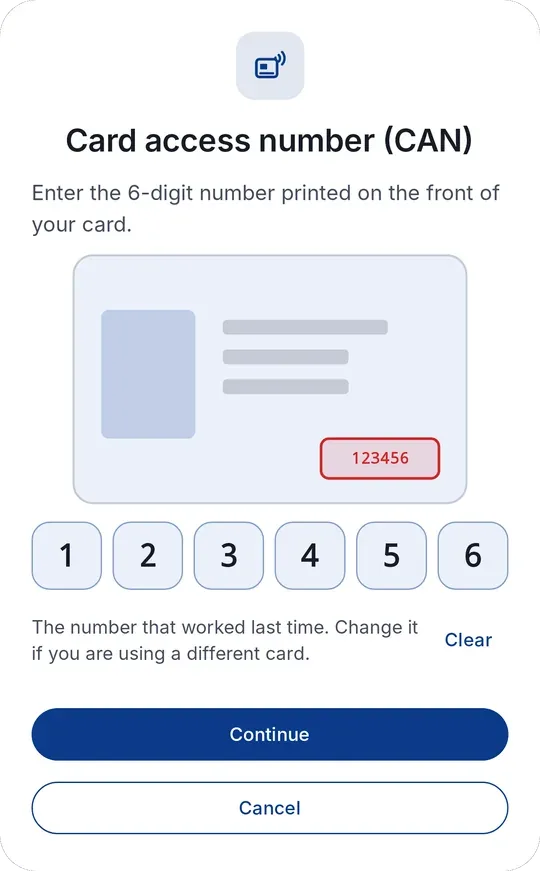
1Enter the card access number (CAN) printed on your card. 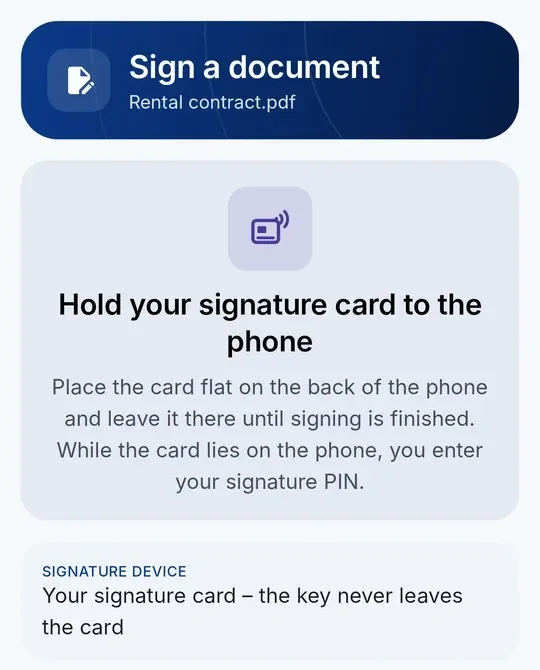
2Hold the card flat against the back of the phone.
Tested so far – and testers wanted
Confirmed with one card. Signing has worked with one real card, issued in 2022, on one phone. Cards issued since 2021 are the same card generation and should behave the same way, but only this one card has been tried.
Cards issued from 2019 to 2021 are untried. They have a different chip. The app has signing steps for them, taken from publicly available technical descriptions, but no real card of this generation has gone through them. Whether they work is not known.
Do you have a Polish ID card issued between 2019 and 2021? We are looking for volunteers. Write to info@aloaha.com: we give you access to the beta and switch on the app's log for you. Then you try to sign a PDF and send us the log – whether it works or not. The log contains no PIN and nothing from your document. If the card refuses a step, the app stops; a wrong PIN is never retried by itself.
What you need
Your Polish ID card with the personal signature certificate, its card access number (CAN) – the 6 digits on the front of the card – and your 6-digit PIN2.
An Android phone with NFC and CodeB Wallet.
How to sign a PDF with the Polish ID card
- On the home screen tap Sign, then Select document and pick a PDF on your phone.
- Check the document, then tap Sign with signature card.
- Enter the 6-digit card access number (CAN) from the front of the card. The app offers the last number that worked.
- Hold the card flat against the back of your phone and leave it there until signing is finished.
- Enter your PIN2 (6 digits). The card signs the document, and the app adds a trusted timestamp.
- You see “Document signed”, with the card used. Tap Save to phone or Share.
A personal signature (podpis osobisty)
The personal signature is an advanced electronic signature made with the certificate on your ID card. It is not a qualified electronic signature, and the app shows it that way.
In Poland it has the effect of a handwritten signature in dealings with public administration; with others it has that effect when both sides agree. Whether a recipient accepts it is for that recipient to decide – ask when in doubt.
The card itself creates the signature – the key never leaves the chip. CodeB Wallet embeds it in the PDF as PAdES (ETSI EN 319 142) with a trusted timestamp. CodeB Wallet itself is not certified.
Security: your card, your PIN, your document
Phone and card first build an encrypted, authenticated connection with the card access number (PACE). Your PIN reaches the chip only over this connection, and the chip checks it. The app never stores your PIN.
The signing key never leaves the card. A wrong PIN is never retried automatically.
The PDF stays on your phone. Only a fingerprint (hash) of the signature is sent to the CodeB timestamp service for the trusted timestamp. No account, no tracking.
PIN2, PIN1 and PUK
Signing uses PIN2, the 6-digit PIN of the personal signature. PIN1 (4 digits) is for signing in to services; the app does not use it.
You set both PINs when you collect the card, or later at a municipal office. CodeB Wallet does not set or change them.
After three wrong tries the card blocks PIN2. The app shows how many tries are left and never retries a wrong PIN by itself. A blocked PIN2 is unblocked with the PUK, using the official tools or at a municipal office.
Tips for a stable connection
Hold the card flat against the back of the phone and keep it still until signing is finished. Remove thick phone cases.
On Android 14 and later the app shows where your phone’s NFC antenna is. If the connection drops, the app continues by itself as soon as the card is back – the card access number is not asked again.
Questions about the Polish ID card
Can I sign PDFs with my Polish ID card on my phone?
Yes. CodeB Wallet signs PDFs over NFC with the Polish e-dowód on Android phones: enter the card access number (CAN), hold the card to the phone and enter your PIN2 – the card creates the signature. So far this is confirmed with a card issued in 2022.
Is it a qualified electronic signature?
No. The personal signature (podpis osobisty) is an advanced electronic signature. In Poland it has the effect of a handwritten signature in dealings with public administration. CodeB Wallet itself is not certified.
Which e-dowód cards work?
Signing is confirmed with one card, issued in 2022; cards issued since 2021 are the same generation. Cards issued from 2019 to 2021 have a different chip and are untried – if you have one, we would be glad to have you as a tester: info@aloaha.com.
Do I need a card reader or a computer?
No. An Android phone with NFC is the card reader. Nothing else needs to be installed.
Which PIN do I need?
PIN2, the 6-digit PIN of the personal signature. PIN1 (4 digits) is not used. The app shows the remaining tries and never retries a wrong PIN by itself.
Where do I find the card access number (CAN)?
On the front of the card, in the bottom right corner: a 6-digit number. It only opens the encrypted connection to the chip; signing always needs your PIN2 as well.
Does my document leave the phone?
No. The PDF stays on your phone. Only a fingerprint (hash) of the signature is sent to the CodeB timestamp service for the trusted timestamp, so the phone needs an internet connection at that moment.
What if PIN2 is blocked?
CodeB Wallet cannot unblock PINs. Unblock PIN2 with the PUK you received with the card, using the official tools, or at a municipal office.
Install the closed beta (Google Play) Closed beta: open only to invited testers signed in to Google Play with the e-mail address on our tester list. To join, request beta access.
No app? Use CodeB Wallet in your browser On an iPhone? Use the CodeB web wallet in Safari. It works today, until the CodeB Wallet app is available for iPhone. For keys kept in your phone’s secure hardware and for showing your ID in person, use the app. How the web wallet works